
 Written by
 Arthritis-friendly home office setup is our topic today. If working from home is painful for you, I have possible solutions to ease your pain with adjustments to your home office.
7 Arthritis Friendly Home Office Setup Essentials
Affiliate Disclosure
Some of the links on this website are affiliate links. This means that at no extra cost to you, I may earn a small commission if you make a purchase through those links. I only recommend products and services I personally use, trust, or believe will bring real value to my readers who are working from home and preparing for retirement income.
Read My Affiliate Disclosure Here
Jeff Shares
From my own experience working from home with arthritis, these small changes can make a big difference in reducing pain and protecting your joints.
1. Supportive Chair With Adjustable Features
When I first started working from home, I didn’t realize how much my chair was contributing to my stiffness and flare-ups. After investing in a supportive chair with lumbar support, adjustable seat height, and cushioned armrests, I noticed a huge difference in my comfort and energy.
Arthritis-Friendly Home Office Setup Tip: Look for a chair with soft armrests — hard ones can strain wrist and elbow joints.
2. Ergonomic Keyboard & Mouse
Typing with stiff hands can feel like running a marathon some days. Switching to an ergonomic split keyboard and vertical mouse helped ease pressure on my fingers and wrists tremendously.
From my experience: The vertical mouse felt odd at first, but now I can’t live without it — it keeps my wrist in a natural handshake position.
3. Adjustable Desk or Desk Riser
Prolonged sitting is tough on arthritic joints. Having a desk riser lets me alternate between sitting and standing, which helps keep stiffness down in my hips and spine.
I don’t stand for long periods — usually short intervals. Even 15–20 minutes every few hours makes a noticeable difference.
4. Wrist, Back, and Foot Cushions
Over the years, I’ve learned that comfort comes from support in all the right places.
- A gel wrist rest keeps my hands neutral
- A lumbar pillow protects my lower back
- And a soft footrest prevents hip strain
These little additions add up to pain relief that you can feel by the end of the day.
5. Voice-to-Text Software
On days when my fingers feel like they’re made of stone, voice-to-text tools have been a lifesaver. I still type — just not constantly.
I often use voice dictation for emails, brainstorming content, or outlining articles when my hands need a break.
Arthritis-friendly home office setup reminder: Productivity doesn’t always mean pushing through pain — sometimes it’s letting technology carry the load.
6. Warmth & Comfort Tools
Cold days make my joints ache more, so I keep warming tools near my desk:
- A small heating pad
- Fingerless gloves
- A warm throw blanket
These help loosen joints and reduce stiffness so I can keep working without pain taking over. You might find these odd to mention in an arthritis friendly home office setup guide, but these warming tools helps me more than you might imagine.
7. Flexible Lighting & Large Screen Display
Eyestrain and neck tension go hand-in-hand with arthritis fatigue. I use a large monitor and adjustable lighting to prevent leaning forward or squinting.
Soft lighting reduces strain, and raising the screen to eye level keeps my neck comfortable — small change, big relief.
Arthritis-Friendly Home Office Setup Note
Working from home with arthritis isn’t always easy — I know that feeling well. But building a workspace that supports your body makes such a meaningful difference. Each of these tools has helped me stay productive, creative, and most importantly… comfortable while working toward my goals.
You deserve a home office that works with your body, not against it.
🛒 Shopping Guide: Top Essentials for an Arthritis-Friendly Home Office Setup
(Each comes with what to look for, why it matters for arthritis, and recommended items.)
1. Supportive, Adjustable Office Chair
What to look for:
- Adjustable seat height, depth and back-angle (so you can keep hips slightly higher or level with knees).
- Strong lumbar support and a backrest that follows the natural S-curve of your spine.
- Padded armrests that can be adjusted or moved out of the way (arm strain aggravates wrist/elbow joints).
- Smooth, stable base (rolls easily) and breathable material (comfort helps when joints ache).
- Preferably a “lift-assist” or easy-adjust mechanism (for those days when joints feel stiff).
Why it matters:
When I worked long hours from a standard chair, I felt hip/low back pain in addition to my hand arthritis. A chair built for joint support made the difference—less stiffness when standing up, fewer “locked up” moments.
Recommended products:


Quick comments:
- FlexiSpot C7 Ergonomic Office Chair – top tier, fully adjustable.
- Hbada E2 Ergonomic Office Chair – solid mid-price choice.
- Staples Hyken Mesh Task Chair – budget mesh option (good airflow, decent support).
- And the others fill in price/feature ranges for readers.
The arthritis-friendly home office setup ergonomic office chairs are a true essential to consider, now depending on your budget I have included a variety of them to choose from.
2. Ergonomic Keyboard & Mouse (to protect wrists/hands)
What to look for:
- A keyboard with soft-touch keys, possibly split or angled layout (reduces finger/hand strain)
- A mouse that keeps the wrist in a “handshake” or neutral position (instead of palm-down) to reduce wrist/elbow joint torque.
- Wireless or low-resistance travel, so your hands aren’t doing “heavy work.”
- Optional: wrist-rests for keyboard/mouse to reduce contact-stress.
Why it matters:
With arthritis in my hands, even typing for an hour could leave me with aching knuckles and a burning wrist. Switching to the right tools meant I could work longer, with fewer “ouch” breaks.
Recommended products:


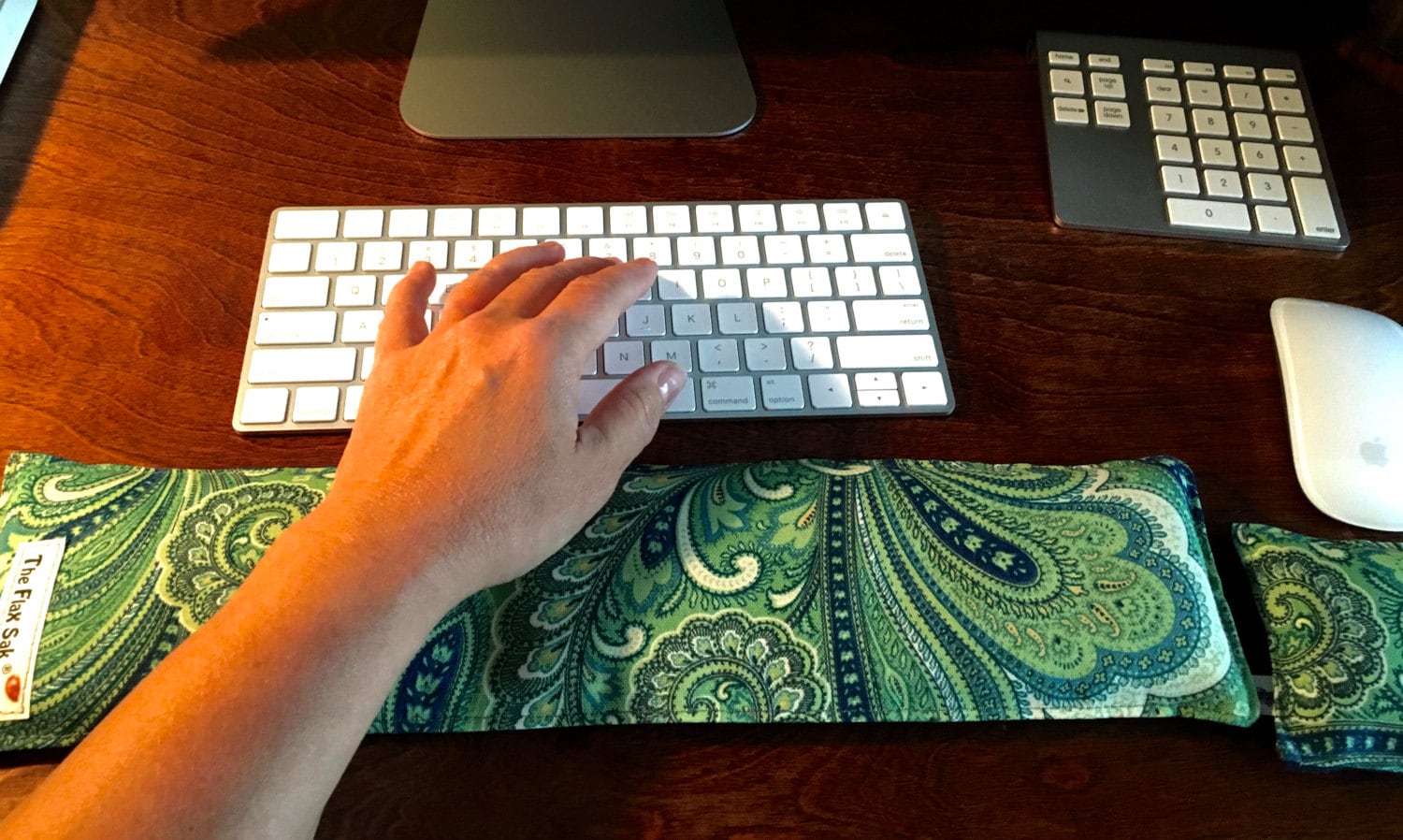 FlaxSakUSA Ergonomic Keyboard & Mouse Wrist‑Rest Pad$24.99•Etsy

Quick comments:
- Logitech MX Vertical Advanced Ergonomic Mouse – premium choice; excellent for heavy users.
- Logitech Lift Vertical Ergonomic Mouse – more affordable, still excellent comfort (deal-friendly).
- And the other options for different budgets and hand sizes.
Ergonomic mouse is another essential arthritis-friendly home office setup product I recommend. These will be extra easy on your wrists and hands.
3. Desk Riser / Adjustable Desk Setup
What to look for:
- A desk (or riser on existing desk) that lets you alternate between sitting and standing (even short shifts help).
- Height that fits you so your elbows are ~90° when typing, monitor at eye level.
- Enough stable surface for your monitor, keyboard/mouse, and maybe a foot-pedal or small side table for wrist breaks.
Why it matters:
I found that after sitting too long, my hips and knees stiffened, which then triggered more hand pain (the body is connected!). Being able to stand, stretch, adjust posture helped my whole system—and then my hands felt better too.
Pro tip: Even standing for 10-15 minutes every couple of hours made noticeable difference.
4. Support Accessories: Wrist & Foot Rests, Lumbar Pillow
What to look for:
- Gel or memory-foam wrist rests (keyboard & mouse) – support your hands when typing.
- Adjustable foot-rest (if feet don’t comfortably reach floor) – prevents hip/knee strain which feeds into upper-body fatigue.
- Lumbar support pillow if your chair doesn’t have good built-in lumbar adjustment.
Why it matters:
Supporting your body from the ground up helps relieve pressure on your spine, hips, shoulders and wrists. When anything is cramped or unsupported, joints “compensate” and arthritis flares.
Recommended products:
(Add into your list above some wrist-rest items as well — e.g., the FlaxSakUSA pad from the keyboard/mouse list.)
5. Warmth & Comfort Tools (for joints)
What to look for:
- Small heating pad or lap blanket (for colder days).
- Fingerless gloves (thin) to keep warmth without sacrificing typing.
- Soft throw or shawl for shoulders/neck when you lean or rest.
Why it matters:
Cold increases joint stiffness. I always keep a warming tool within reach at my desk — works especially well when I’m in a “freeze-up” period after sitting.
6. Lighting & Monitor Setup
What to look for:
- Monitor raised so the top 1/3 is at eye level (prevents neck strain).
- Soft-side lighting (desk lamp) so you’re not straining eyes/neck.
- Large screen or dual monitors (to reduce leaning/forward stretching).
- A layout that keeps frequently-used items within comfortable reach (so you’re not stretching wrist/arm/reaching across desk often).
Why it matters:
Every time you lean in or reach awkwardly you’re straining more than just your back — your wrists, shoulders and elbows feel it later. Paying attention to monitor + reach helps prevent those joint flare triggers.
7. Budget Conscious Shopping Tips
- Prioritize one key upgrade first (chair or mouse) based on your worst-felt joint pain.
- Look for sales (end of quarter, Black Friday, open-box).
- Don’t feel you must buy luxury — many budget ergonomic options still provide huge relief.
- Consider used/refurbished carefully (still check adjustability & condition).
- Add your “comfort accessories” (wrist-rest, throw, foot-rest) gradually — they are lower cost but high impact.
You have just read my arthritis-friendly home office setup shopping guide. Next I have for you break and stretching guide that I use myself daily.

Daily Arthritis Friendly Break & Stretching Guide
A simple routine I personally use each day to loosen stiff joints, ease tension, and reset my energy while working from home.
Important: Always move within your comfort zone — slow, gentle, and intentional. These exercises are meant to relieve pain, not cause strain.
How Often I Do This
- Every 60–90 minutes while working
- 5–7 minutes per break
- Short, gentle movements — no floor exercises, no complicated poses
Because when we move frequently, we hurt less and work happier. Believe it or not, this guide is an important part of my arthritis friendly home office setup guide.
My Daily Arthritis-Friendly Stretch Routine
1. Shoulder Rolls (30 seconds)
I start with my shoulders because that’s where tension builds first.
How I do it:
- Sit or stand tall
- Roll shoulders up, back, and down
- Nice slow circles
Why it helps: Releases neck & upper-back stiffness that sneaks in while typing.
2. Neck Mobilizer (1 minute)
I do this slowly — stiff neck days happen!
How I do it:
- Gently lower ear toward shoulder (don’t lift shoulder)
- Hold 10 seconds each side
- Slow chin-to-chest nods
- Look side-to-side gently
Pro tip: Imagine moving through warm honey, not rushing.
3. Wrist & Finger Loosening (1 minute)
My hands take the brunt of arthritis — this helps me keep typing comfortably.
Moves I use:
- Open hands wide → make soft fist → repeat 10x
- Gentle wrist circles
- Press palms together and hold 5–10 seconds (just to comfort level)
On tough hand days: I hold a warm rice pad or microwavable wrap first.
4. Elbow & Forearm Relief (30 seconds)
Typing and mouse use can make elbows ache (before I changed equipment — lesson learned!)
How I do it:
- Hold arm out, palm down, gently flex wrist down
- Switch sides
- Repeat palm up stretch if needed
Feels wonderful after long mouse sessions.
5. Seated Hip & Back Release (1 minute)
Sitting too long locks everything up!
How:
- Sit tall
- Gently twist torso right & hold 10 seconds
- Switch left
- Lean forward (hands on knees) for gentle low-back opening
Note: Gentle is the keyword — we don’t need extreme stretching to feel relief.
6. Ankle Rolls & Toe Taps (30 seconds)
To keep circulation going and prevent stiff calves and feet.
How I do it:
- Lift one foot and circle ankle 10x each direction
- Repeat other side
- Finish with light toe taps on floor (like tapping to music)
Keeps me feeling steady when I stand up.
7. Standing Posture Reset + Arm Reach (1 minute)
This is my “reset moment.”
How:
- Stand tall
- Reach arms overhead (or as high as comfortable)
- Inhale deeply
- Lower arms slowly
- Open chest by gently squeezing shoulder blades back
I always end with one deep breath and a slow exhale — feels like calm washing over me.
Bonus: Warmth & Ease Ritual (Optional)
On colder or high-pain days, I do this before stretching:
✔ Warm blanket or shawl
✔ 2–5 minutes with a heating pad on hands or lower back
✔ Warm tea or water sip
Warm joints move happier — our bodies really do appreciate kindness.
Arthritis-Friendly Home Office Setup Encouraging Note
Working from home with arthritis means learning to listen to your body. These gentle breaks help me stay productive without sacrificing my well-being — and I hope they give you that same sense of comfort and control.
You don’t have to power through pain.
You deserve breaks.
Your body deserves care.
And every time you honor that, you’re choosing health and hope. Check out Jeff’s Free Learning Hub for more bonus gifts if you have the time.
Arthritis Friendly Home Office Setup Free Downloads
Thank you for visiting BoomerBizHQ today, and for reading my arthritis-friendly home office setup guide. I have for you several free downloads for reading my entire step-by-step guide below.
- Arthritis Warm Up Routine
- Daily Arthritis Break & Stretch Guide
- Arthritis Break Stretch Cheklist
- Quick Arthritis Break Desk Card
Now if you have a little time, I would greatly appreciate if you could share your experience in my comments section. By leaving me comments you are helping my website grow, and I thank you for this kind gesture.
Jeff/BoomerBizHQ
- How To Prepare For Retirement With Ebooks For Serious IncomeHow to prepare for retirement with ebooks is totally from my own experience. All my articles are senior-friendly written with older adults in mind. Affiliate Disclosure Amazon + Wealthy Affiliate + Friends You will never find any affiliate links in any of my step-by-step guides on any of my websites, I feel that my guides… Read more: How To Prepare For Retirement With Ebooks For Serious Income
- How To Create Video Marketing Content In 10 Simple StepsHow to create video marketing content can be scary for many people, but this is even more scary for older adults who lack the confidence in using technology. We are going to learn this together step-by-step, now lets begin our new journey together. Affiliate Disclosure Amazon + Wealthy Affiliate + Friends You will never find… Read more: How To Create Video Marketing Content In 10 Simple Steps
- How To Choose AI Writing Tools That Are Easy To UseHow to choose AI writing tools that are easy to use for older adults. I prefer using ChatGPT most of the time myself, but we will learn about others that you can consider to use as your personal writing assistant. Affiliate Disclosure Amazon + Wealthy Affiliate + Friends You will never find any affiliate links… Read more: How To Choose AI Writing Tools That Are Easy To Use
- How To Choose Affiliate Programs For Simple Retirement IncomeHow to choose affiliate programs for simple retirement income for older adults. We are going to learn about affiliate marketing, affiliate programs, and how you can use these for retirement income. Affiliate Disclosure Amazon + Wealthy Affiliate + Friends You will never find any affiliate links in any of my step-by-step guides on any of… Read more: How To Choose Affiliate Programs For Simple Retirement Income
- How To Design Downloadable Printables Easy Simple StepsHow to design downloadable printables is a very handy skill to learn. You can then share them with your readers in a variety of ways. If this is something you have the interest to learn, you will want to read my article today. Affiliate Disclosure Amazon + Wealthy Affiliate + Friends You will never find… Read more: How To Design Downloadable Printables Easy Simple Steps


























This post is incredibly insightful and practical for anyone managing arthritis while working from home. I appreciate how you broke down each element—from ergonomic chairs to warmth tools—in such an accessible and compassionate way. It’s clear that every recommendation comes from personal experience, which makes the advice even more valuable. I especially liked your reminder that productivity doesn’t mean pushing through pain; instead, it’s about working with your body. The inclusion of stretching and movement routines is such a thoughtful touch—simple, low-impact exercises that make a real difference in daily comfort. The emphasis on warmth, flexibility, and mindful posture shows how small adjustments can lead to major relief. Thank you for creating a guide that’s not only functional but also empowering. It’s a wonderful reminder that with the right setup and self-care, working from home with arthritis can be both comfortable and sustainable.
Thank you Andrejs
I truly thank you from the bottom of my heart for sharing your experience reading Arthritis friendly home offic setup essentials for older adults.
Jeff